AI and Software Development Company | Tech Biz Builders

self-hosted automation

N8N

Migrating to n8n Self-Hosted from a SaaS Platform: A Complete Checklist

Migrating to n8n Self-Hosted from a SaaS Platform: A Complete Checklist Are you tired of the limitations and costs associated with using a SaaS platform? Do you want more control over your data and processes? Migrating to n8n self-hosted can be the solution. This comprehensive guide will walk you through every step of the process, ensuring a smooth transition and maximizing the benefits of self-hosting. Evaluating Your Current SaaS Platform Before making the decision to migrate, it’s crucial to evaluate your current SaaS platform. Consider the following: What are your specific needs? Are there any limitations or bottlenecks? How does the pricing model compare? Do you have control over your data and processes? Setting Up n8n Self-Hosted Setting up n8n self-hosted involves several steps. Here’s a quick overview: Install Docker: Ensure you have Docker installed on your server. Create Environment Variables: Set up the necessary environment variables for n8n. Pull and Run the Container: Use Docker commands to pull and run the n8n container. Importing Your Workflows Once your n8n instance is up and running, it’s time to import your workflows from your SaaS platform. Export from SaaS: Export your workflows in a compatible format. Import into n8n: Use the n8n UI or API to import the workflows. Customizing and Optimizing n8n After importing, you’ll need to customize and optimize your n8n instance. Create Custom Nodes: If necessary, create custom nodes to integrate with your specific needs. Configure Triggers: Set up triggers for automated workflows. Optimize Performance: Tune settings for better performance and scalability. Security Considerations Security is a critical aspect of self-hosting. Implement the following measures: Use HTTPS: Ensure your n8n instance uses a secure connection. Regular Backups: Set up regular backups to protect your data. Access Control: Implement strict access controls and authentication methods. Training Your Team Finally, it’s time to train your team on using n8n. Workshop Sessions: Organize training sessions to familiarize team members with the platform. Documentation: Provide comprehensive documentation and support resources. Feedback Loop: Establish a feedback loop for continuous improvement. Conclusion Migrating to n8n self-hosted can significantly enhance your workflow flexibility, data control, and overall satisfaction. By following this comprehensive checklist, you’ll be well-equipped to make the transition smoothly and maximize the benefits of self-hosting. Image by: Jakub Zerdzicki

self-host N8N
Workflow Automation

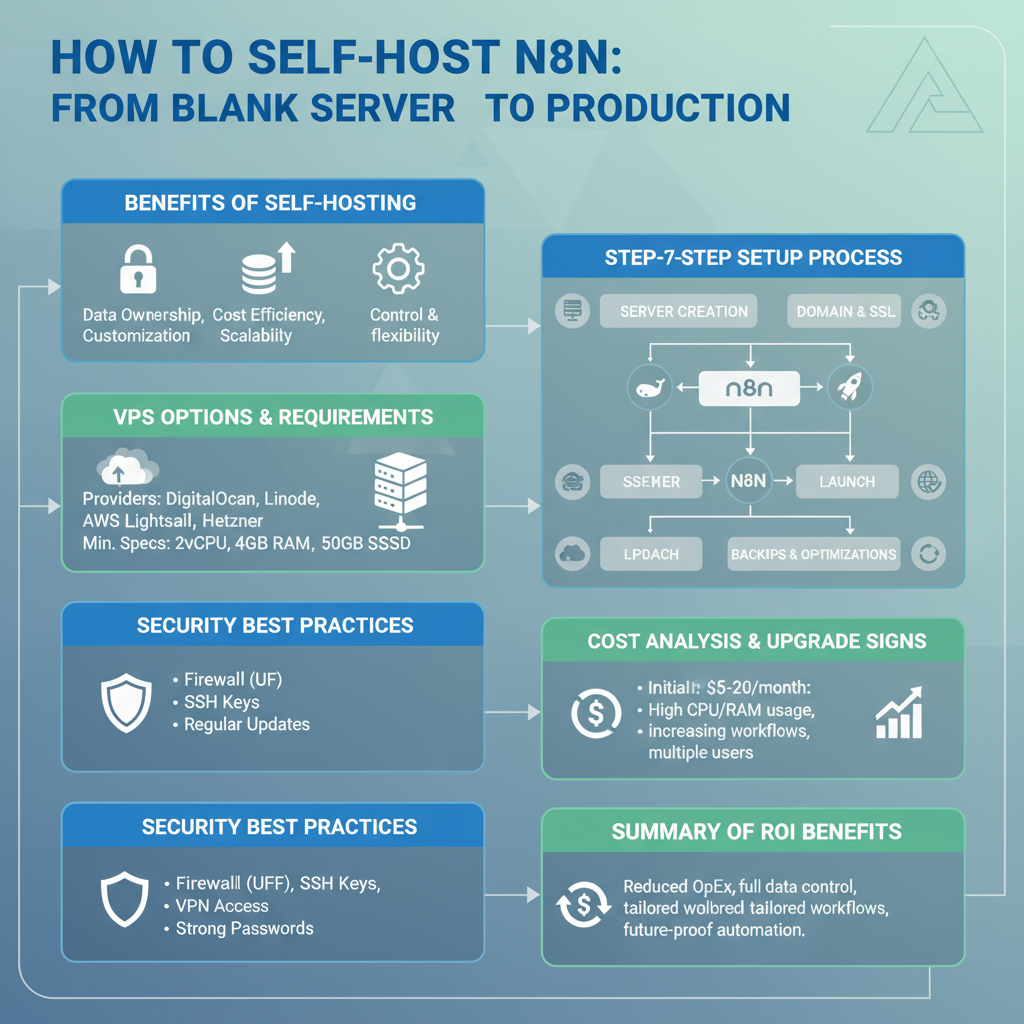
N8N Self-Hosting Guide: Complete Setup from Zero to Production

Self-hosting N8N gives you unlimited workflows, complete data control, and massive cost savings compared to cloud automation platforms. But the setup process intimidates many people. | self-host N8N I’ve deployed N8N for dozens of clients, and I’m going to walk you through the exact process I use—from a completely blank server to a secure, production-ready N8N instance. Why Self-Host N8N? Before we dive into technical details, let’s confirm this is right for you. Self-hosting makes sense if you: Stick with N8N Cloud or alternatives if you: Still here? Let’s build this. Choosing Your Server You need a Virtual Private Server (VPS). Here are proven options: DigitalOcean ($6-12/month): Best for beginners. Simple interface, great documentation, reliable performance. Recommended: Basic Droplet with 2GB RAM Hetzner ($5-8/month): Best value. European servers, excellent performance per dollar. Recommended: CX21 or CPX11 AWS Lightsail ($10-20/month): Best for enterprises already using AWS ecosystem. Recommended: 2GB instance Linode ($10-12/month): Solid middle ground. Good performance, responsive support. Recommended: Nanode 2GB For starting out, I recommend DigitalOcean. The rest of this guide assumes you’re using it, but the process is similar across providers. Server Requirements Minimum specifications: Don’t skimp on RAM. N8N with several workflows can consume 1-1.5GB easily. Step 1: Server Setup and Security Create your droplet/server with Ubuntu 22.04. Once it’s running, SSH in: First, update everything: Create a non-root user for security: Set up firewall: From now on, use the n8n user, not root. Step 2: Install Docker N8N runs best in Docker. It’s cleaner, easier to maintain, and simpler to upgrade. Install Docker: Log out and back in for group changes to take effect. Install Docker Compose: Verify installation: Step 3: Set Up N8N with Docker Compose Create a directory for N8N: Create a docker-compose.yml file: yaml Replace change_this_password with a strong password and your_domain.com with your actual domain (we’ll set this up next). Step 4: Domain and SSL Setup You need a domain name pointing to your server. Use Namecheap, Google Domains, or any registrar. Add an A record pointing to your server’s IP address. Install Nginx: Install Certbot for free SSL certificates: Create Nginx configuration for N8N: Add this configuration: nginx Enable the site: Get SSL certificate: Certbot will automatically configure SSL. Choose option 2 to redirect HTTP to HTTPS. Step 5: Launch N8N Start N8N: Check if it’s running: Visit https://your_domain.com in your browser. You should see the N8N login screen! Step 6: Configure Backups Never skip backups. N8N stores everything in ~/.n8n/, so back this up regularly. Create a backup script: bash Save as backup-n8n.sh, make executable: Schedule daily backups with cron: Add this line: This backs up daily at 2 AM, keeping the last 7 backups. Step 7: Production Optimizations Increase Docker Resources: Edit docker-compose.yml to add memory limits: yaml Enable Execution Data Pruning: Add to environment variables: yaml This deletes execution logs older than 7 days, preventing database bloat. Set Up Monitoring: Use Uptime Robot or similar to monitor your N8N instance and alert you if it goes down. Step 8: Updating N8N When new versions release: Always check the N8N changelog for breaking changes before updating. Troubleshooting Common Issues N8N won’t start: Check logs: docker-compose logs n8n Webhooks not working: Verify WEBHOOK_URL is set correctly in docker-compose.yml Out of memory errors: Upgrade to a server with more RAM or optimize workflows SSL certificate renewal fails: Ensure ports 80 and 443 are open and Nginx is running Can’t access N8N: Check firewall: sudo ufw status Verify Nginx is running: sudo systemctl status nginx Security Best Practices Change default passwords immediately Enable two-factor authentication if using N8N’s user management Regularly update both N8N and the underlying server Restrict SSH access to specific IP addresses if possible Monitor logs for unusual activity Use strong encryption keys for N8N’s encryption features Advanced: Multi-User Setup For teams, set up proper user management: yaml This enables N8N’s built-in user management system. Cost Breakdown Monthly costs for self-hosted N8N: Compare to cloud platforms charging $50-200+ for similar workflow volumes. When to Upgrade Your Server Upgrade if you experience: Simply resize your server in your hosting dashboard—most providers allow this with minimal downtime. The Bottom Line Self-hosting N8N requires initial time investment, but the payoff is substantial. You get unlimited automation power at a fraction of cloud platform costs. The process looks long in this guide, but actual setup time is 1-2 hours. Ongoing maintenance is minimal—maybe 30 minutes monthly for updates. If you handle sensitive data or run heavy automation, self-hosting isn’t just cheaper—it’s better. Ready to take control of your automation infrastructure? Start today.

Make.com vs N8N
AI Automation

Make.com vs N8N: The Ultimate Automation Showdown for 2025

The automation space is getting crowded, and two platforms keep coming up in every conversation: Make.com (formerly Integromat) and N8N. Both are powerful, both are popular, and both can transform how you work. | Make.com vs N8N But which one deserves your time and money? Let’s break it down. Visual Design: Where Make.com Excels Make.com has the most beautiful workflow builder I’ve ever used. Seriously. Their visual canvas with colorful nodes and clear connection lines makes complex workflows feel manageable. You can see your entire automation at a glance. Data flows visually between modules, and troubleshooting is intuitive. For visual thinkers, this is paradise. N8N’s interface is clean but more technical. It feels like a developer tool (because it is). While functional, it doesn’t have the same polish as Make.com’s interface. Integration Depth: A Critical Difference Here’s something most comparisons miss: both platforms might connect to the same apps, but the depth of those integrations varies wildly. Make.com has deeply integrated modules for popular apps. Every field, every option is available with clear labels and helpers. It’s like they’ve pre-built the entire app experience into their platform. N8N takes a more raw approach. You often work directly with APIs, which gives you more flexibility but requires more technical knowledge. Want to access a specific Salesforce field? You might need to know the API field name. Pricing Models: Math That Matters Let’s talk money, because this often determines the winner. Make.com pricing: N8N pricing: The pricing models are different, which makes direct comparison tricky. For simple workflows with many steps, N8N is cheaper. For complex workflows with fewer steps, Make.com might win. When Make.com is the Right Choice Choose Make.com if you: Make.com shines for marketing teams, small businesses, and anyone who needs to build automations quickly without technical expertise. When N8N Makes More Sense Go with N8N if you: N8N is perfect for tech companies, agencies building client automations, and businesses with specific security requirements. Feature Comparison That Actually Matters Error handling: Make.com has superior built-in error handling with automatic retries and clear error paths. N8N requires more manual setup but offers more customization. Scheduling: Both platforms handle scheduling well, but N8N gives you cron-level control if you need it. Data manipulation: N8N wins here with powerful JavaScript expressions in every node. Make.com has functions too, but they’re more limited. Community: N8N’s open-source community is incredibly active. The Make.com community is large but less collaborative since it’s a closed platform. Real-World Performance I’ve run both platforms in production environments. Here’s what I’ve observed: Make.com executions are consistently fast, typically 2-5 seconds for moderate workflows. Their infrastructure is rock-solid, and I’ve experienced minimal downtime. N8N’s self-hosted performance depends entirely on your server setup. With proper resources, it matches or exceeds Make.com. Cloud-hosted N8N performs comparably to Make.com. The Hybrid Approach Here’s a strategy many smart businesses use: run simple, high-volume workflows on N8N to control costs. Use Make.com for complex, mission-critical automations where the visual interface and reliable integrations justify the cost. You don’t have to marry one platform. Use each where it makes sense. My Recommendation For most small to medium businesses without technical teams: Start with Make.com. The learning curve is gentler, and you’ll get results faster. For technically-inclined teams or businesses with high operation volumes: Go with N8N. The cost savings and flexibility are worth the steeper learning curve. For enterprises with mixed teams: Use both strategically based on workflow complexity and team capabilities. Both platforms are excellent. Your choice should depend on your team’s skills, budget constraints, and specific workflow requirements rather than which tool is “better.”

AI Automation

N8N vs Zapier: Which Automation Tool is Right for Your Business in 2025?

Choosing the right automation platform can make or break your productivity goals. If you’re tired of paying hefty subscription fees for Zapier or looking for more control over your workflows, you’ve probably stumbled across N8N. But is it really worth the switch? | n8n automation Let me walk you through everything you need to know about these two automation giants. What Makes N8N Different? N8N is an open-source workflow automation tool that’s been gaining serious traction among developers and tech-savvy businesses. Unlike Zapier’s black-box approach, N8N gives you complete visibility into how your automations work. The biggest advantage? You can self-host N8N on your own servers. This means no monthly fees eating into your budget, and complete control over your data. For businesses handling sensitive information, this is huge. The Zapier Advantage Don’t get me wrong—Zapier isn’t popular by accident. With over 5,000 app integrations and a dead-simple interface, it’s the go-to choice for non-technical teams. You can set up a workflow in minutes without writing a single line of code. Zapier’s strength lies in its plug-and-play nature. Need to connect your Gmail to Slack? Done in three clicks. Want to automate your lead capture from Facebook Ads to your CRM? There’s a pre-built Zap for that. Pricing: Where the Gap Widens Here’s where things get interesting. Zapier starts at $19.99 per month for 750 tasks, and prices escalate quickly as your needs grow. Enterprise plans can run into thousands of dollars monthly. N8N’s self-hosted version is completely free. Yes, free. You only pay for your server costs, which typically run $5-20 monthly on platforms like DigitalOcean or AWS. They also offer a cloud version starting at $20/month if you prefer managed hosting. For a growing business running 10,000+ tasks monthly, you could save $200-500 monthly by switching to N8N. Which One Should You Choose? Choose Zapier if you: Choose N8N if you: Real-World Use Cases I’ve helped dozens of businesses migrate from Zapier to N8N, and here’s what works best: E-commerce stores love N8N for inventory management workflows that sync across multiple platforms without hitting API rate limits. Marketing agencies use it to build complex lead nurturing sequences that would cost a fortune on Zapier’s task-based pricing. SaaS companies leverage N8N’s webhooks and custom functions to build product-specific automations that simply aren’t possible with Zapier’s limitations. The Bottom Line Both tools have their place in 2025. Zapier is still the king of ease-of-use, but N8N is rapidly closing the gap while offering unbeatable value for technically-inclined teams. Start with Zapier if you need results today. Consider N8N if you’re building for tomorrow and want full control over your automation infrastructure. The best part? You don’t have to choose forever. Many businesses start with Zapier and gradually migrate critical workflows to N8N as their needs evolve.

Scroll to Top