
How to Build an AI-Powered Customer Support System That Actually Works
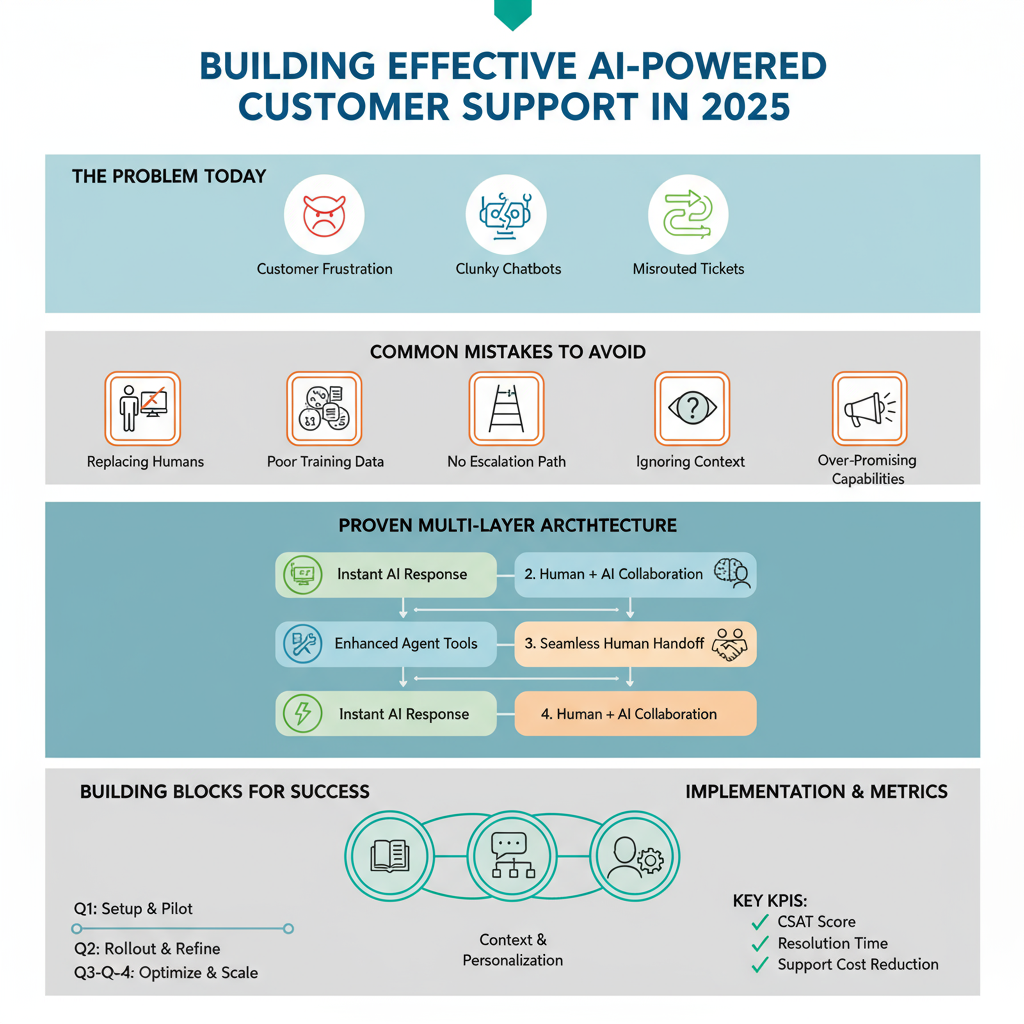
AI-powered customer support is everywhere now, but here’s the uncomfortable truth: most implementations are terrible. | AI customer support Customers get frustrated with chatbots that don’t understand them. Support tickets get misrouted. Questions go unanswered. Companies save money but lose customers. It doesn’t have to be this way. I’ve built AI support systems that customers actually like—systems that improve satisfaction while reducing costs. Let me show you how. Why Most AI Support Systems Fail Before building a solution, understand why others fail: Mistake 1: Replacing humans entirely AI should assist, not replace. The best systems blend AI efficiency with human empathy. Mistake 2: Poor training data Your AI is only as good as what it learns from. Garbage in, garbage out. Mistake 3: No escalation path When AI can’t help, customers need a clear path to human support—fast. Mistake 4: Ignoring context AI that treats returning customers like strangers creates frustration. Mistake 5: Over-promising Setting expectations that AI handles “everything” leads to disappointed customers. The Architecture That Works Here’s the proven structure for effective AI support: Layer 1: Instant AI Response (First 30 seconds) AI immediately acknowledges the inquiry, understands the question, and attempts resolution using your knowledge base. Layer 2: Enhanced AI with Tools (30 seconds – 5 minutes) If Layer 1 doesn’t resolve it, AI accesses additional tools: order lookup, account status, FAQ database, previous ticket history. Layer 3: Human Handoff (5+ minutes) For complex issues, AI creates a detailed summary and routes to the right human agent with full context. Layer 4: Human + AI Collaboration Agent handles the interaction with AI suggesting responses, pulling relevant information, and documenting the conversation. This architecture ensures customers get help fast while maintaining quality. Building Block 1: Knowledge Base Optimization Your AI is only as good as the information it can access. Here’s how to prepare: Audit existing documentation: Identify gaps, outdated info, and unclear explanations. Structure for AI consumption: Use clear headings, consistent formatting, and explicit answers to common questions. Create a question-answer database: Don’t just have articles—have specific Q&A pairs the AI can reference. Include edge cases: Document unusual scenarios and exceptions. Keep it updated: Set a monthly review schedule. AI trained on outdated information creates more problems than it solves. Building Block 2: Conversation Design AI conversations need careful design. Here’s the framework: Opening: Friendly acknowledgment + understanding check Example: “I understand you’re having trouble logging in. Let me help you with that.” Information gathering: Ask clarifying questions one at a time Bad: “What’s your email, order number, and the issue?” Good: “What email address did you use for your account?” Resolution attempt: Clear, actionable steps Use numbered lists. Confirm understanding. Check if the solution worked. Escalation trigger: Know when to hand off If AI asks for clarification more than twice, route to human. Closing: Ensure satisfaction before ending “Did this solve your issue?” with clear yes/no options. Building Block 3: Context and Personalization Generic AI responses feel robotic. Add context: Customer history: Reference previous interactions naturally. “I see you had a similar question last month about shipping…” Account status: Acknowledge their relationship with you. “As a premium member, I can fast-track this for you…” Current situation: Show you understand their specific case. “Since your order was placed yesterday, it’s still in processing…” Tone matching: Adjust formality based on how they communicate. Casual customer → friendly AI. Formal inquiry → professional AI. The Technology Stack Here’s a practical stack that works: AI Model: Claude or GPT-4 for conversation and understanding Vector Database: Pinecone or Weaviate for knowledge base search Integration Platform: Make.com or N8N to connect everything Helpdesk: Zendesk, Intercom, or Front for ticket management Analytics: Custom dashboard tracking resolution rates, handoff frequency, customer satisfaction Total monthly cost for small to medium business: $200-500 Implementation Roadmap Week 1-2: Preparation Week 3-4: Build MVP Week 5-6: Test and Refine Week 7-8: Expand Week 9+: Optimize Measuring Success: The Metrics That Matter Track these KPIs: AI Resolution Rate: Percentage of inquiries fully resolved by AI Target: 40-60% for most businesses Time to Resolution: Average time from inquiry to resolution Goal: Reduce by 50% or more Customer Satisfaction Score: Post-interaction ratings Target: Match or exceed human-only support scores Handoff Rate: How often AI escalates to humans Goal: Under 40% with clear handoff reasons Cost Per Ticket: Total support cost divided by tickets handled Typical savings: 30-50% cost reduction First Response Time: How quickly customers get initial response Target: Under 30 seconds Handling Different Support Channels Email Support: AI can draft complete responses that agents review before sending. This works well because timing isn’t critical. Live Chat: AI provides instant first response and handles simple questions fully. Seamless handoff to humans for complex issues. Phone Support: AI voice agents handle initial routing and information gathering, then connect to appropriate human agent with context. Social Media: AI monitors mentions, categorizes by urgency, drafts responses for agent approval. Never fully automated—too risky. The Human Element: Training Your Team Your support team might feel threatened by AI. Address this directly: Position AI as an assistant, not a replacement: Show how AI handles repetitive questions so they can focus on complex, interesting problems. Involve them in improvement: Support agents should review AI responses and suggest improvements. Highlight new opportunities: With AI handling basics, agents can focus on relationship building and solving challenging problems. Provide AI training: Teach your team how to work alongside AI effectively. Common Pitfalls and How to Avoid Them Pitfall: AI inventing answers Solution: Implement strict knowledge base search. If no confident answer exists, escalate immediately. Pitfall: Circular conversations Solution: Set a maximum of 2-3 clarification attempts before human handoff. Pitfall: Tone-deaf responses Solution: Detect frustration keywords and immediately escalate. Never let AI argue with angry customers. Pitfall: Privacy concerns Solution: Never have AI request sensitive information. Route to secure human channels for payment details, passwords, etc. Pitfall: Over-automation Solution: Always provide a clear “talk to a human” option within first response. Advanced Features to Add Later Once your basic system