AI and Software Development Company | Tech Biz Builders

AI chatbots

LLM

Gemma AI Free Access: Your Guide to Powerful Open-Source Chatbots

Gemma AI Free Access: Your Guide to Powerful Open-Source Chatbots Are you curious about the latest advancements in artificial intelligence? Large language models (LLMs) are revolutionizing how we interact with technology, and Gemma AI is making it even more accessible. You’ve likely heard buzz about AI chatbots capable of generating human-quality text, writing code, and even creating different kinds of creative content. But what exactly is Gemma? And more importantly, how can you get free access to this powerful AI model? This comprehensive guide will walk you through everything you need to know to get started with Gemma AI, from understanding its capabilities to exploring different use cases. We’ll cover the free access process, potential limitations, and resources available to help you make the most of this exciting technology. | Gemma AI free access What is Gemma AI? Gemma AI is a family of open-weights large language models created by the Gemma team at Google DeepMind. This means the model weights are publicly available, giving developers and researchers the freedom to use, study, and modify the model for their own projects. Unlike closed-source models, Gemma fosters transparency and community-driven innovation. This open-weights approach is a significant departure from the traditional AI landscape and empowers users to build upon pre-trained models, leading to faster development and more customized solutions. The models are designed to be lightweight and efficient, making them suitable for a variety of hardware configurations. Key Features of Gemma Gemma models are built with a focus on responsible AI development. They are designed to be helpful, harmless, and honest. Here’s a deeper dive into what makes Gemma stand out: Open Weights: The biggest draw – full access to the model parameters for customization and research. Efficiency: Optimized for a variety of hardware, including CPUs, making it accessible to a wider range of users. Strong Performance: Competes with other open-source models in various benchmarks. Responsible AI: Designed with safety and ethical considerations in mind. How to Get Free Access to Gemma AI The process of accessing Gemma is straightforward. Google DeepMind provides several ways to download and utilize the models. The primary method involves utilizing the Gemma API. You can access the API through the Google Cloud Platform (GCP), which offers a free tier for experimentation. Alternatively, Hugging Face provides a convenient way to explore and download the Gemma models. Each platform offers different levels of access and features. Using the Gemma API on Google Cloud Platform (GCP) Here’s a step-by-step guide on how to leverage the Gemma API on GCP: Create a Google Cloud Project: If you don’t already have one, create a project on the Google Cloud Console. Enable the Vertex AI API: Enable the Vertex AI API within your project. This will unlock the ability to access the Gemma models. Configure Authentication: Set up authentication to access the API. This usually involves creating a service account and downloading a JSON key file. Write Code to Interact with the API: Use a programming language like Python to send requests to the API and receive responses from the Gemma models. The Vertex AI SDK provides helpful tools and examples. Accessing Gemma through Hugging Face Hugging Face offers a user-friendly interface for accessing and experimenting with the Gemma models. You can directly download the model weights and use them in your local environment. Hugging Face also provides a library for simplifying model interactions. This method is particularly beneficial for researchers and developers who prefer to work with models locally. The free tier of Hugging Face provides sufficient resources for many use cases. Gemma AI: Potential Use Cases The versatility of Gemma AI opens up a wide range of possibilities. Here are some examples of how you can utilize this powerful technology: Content Creation: Generate blog posts, social media updates, marketing copy, and more. Code Generation: Assist with writing code in various programming languages. Chatbots and Conversational AI: Build interactive chatbots for customer service or general conversation. Summarization: Condense large amounts of text into concise summaries. Translation: Translate text between different languages. Data Analysis & Insights: Analyze unstructured data and extract meaningful insights. Example: Building a Simple Chatbot Imagine you want to create a simple chatbot for answering frequently asked questions. Using Gemma, you can fine-tune the model on a dataset of questions and answers. This allows the chatbot to provide more accurate and relevant responses. This can automate customer support and free up human agents to handle more complex issues. Use Case Description Content Generation Creating articles, stories, and marketing copy Code Generation Assisting developers with coding tasks Chatbots Developing conversational AI agents Summarization Condensing long documents into shorter versions Limitations and Considerations While Gemma AI offers impressive capabilities, it’s important to acknowledge its limitations. Like all LLMs, Gemma can sometimes generate inaccurate, biased, or nonsensical responses. It can also struggle with complex reasoning tasks or tasks requiring real-world knowledge. Bias in training data can lead to biased outputs, so it is critical to be aware of this potential issue and mitigate it through careful prompt engineering and model evaluation. Also, performance can vary depending on the hardware and specific implementation. Fine-tuning the model on a specific dataset can significantly improve performance for targeted applications. Responsible AI and Bias Mitigation Google DeepMind emphasizes responsible AI development, and ethical considerations are central to the Gemma project. However, it’s the user’s responsibility to ensure that the model is used ethically and responsibly. This includes being aware of the potential for bias and taking steps to mitigate it. Thorough testing and evaluation are vital before deploying Gemma in any real-world application. Prompt engineering techniques can also help to steer the model away from generating harmful or inappropriate content. Getting Started: Resources and Community Support To further your exploration of Gemma AI, several resources are available: Google DeepMind Documentation: The official documentation provides comprehensive information about the Gemma models and API. Hugging Face Hub: Find the Gemma model weights and explore community-created examples. Community Forums: Engage with other Gemma users and developers on

AI Automation

How to Build a No-Code AI Chatbot That Actually Converts Customers

How to Build a No-Code AI Chatbot Table of Contents Introduction In the digital age, customers expect instant and personalized interactions. Businesses eager to meet these expectations are turning to AI chatbots. Yet, many hesitate due to perceived technical complexity. This guide demystifies the process by showing how to create a no-code AI chatbot that not only interacts but converts — all without needing to write a single line of code. Why No-Code AI Chatbots Are Game-Changers No-code platforms empower businesses to build intelligent chatbots quickly, saving development time and costs. AI integration ensures conversations feel natural, improving customer satisfaction and driving higher engagement. The best no-code AI chatbots go beyond basic automation by understanding intent, offering personalized recommendations, and guiding users toward decisions that matter. Step-by-Step Guide to Building Your Chatbot Step 1: Define Your Chatbot’s Purpose and Goals Start by clarifying what your chatbot should achieve. Are you capturing leads, providing customer support, or driving sales? Clear goals will shape your conversational design and AI capabilities. For example, a lead capture chatbot must gather emails, while a sales chatbot should highlight product benefits with persuasive messaging. Step 2: Choose the Right No-Code AI Chatbot Builder Select a platform that combines ease of use with powerful AI features. Popular options include: Step 3: Design Conversational Flows That Engage Map out typical customer journeys and create dialog paths. Use question-answer sequences, quick replies, and buttons to guide users seamlessly. Avoid overwhelming users with long messages; keep interactions concise and purposeful. Including fallback responses anticipates unexpected inputs and preserves user experience. Step 4: Integrate AI with Personalized Responses Incorporate AI-powered NLP (Natural Language Processing) to interpret user intent and respond intelligently. Many no-code platforms offer built-in AI modules or integration with services like OpenAI’s GPT models. Personalization boosts conversions—use collected user data to tailor recommendations and offers dynamically. Step 5: Test, Optimize, and Launch Your Chatbot Before going live, rigorously test all conversational paths, logic branches, and integrations. Collect feedback from test users to identify friction points or confusing flows. Use analytics provided by chatbot platforms to track engagement and conversion metrics post-launch to continuously refine performance. Best Practices to Maximize Conversion Conclusion Building a no-code AI chatbot that converts customers is within everyone’s reach with the right approach. By focusing on clear goals, choosing suitable platforms, designing engaging flows, and leveraging AI personalization, businesses can delight customers and boost revenue without complex development. Start small, test often, and scale your chatbot’s capabilities as you learn—automation success awaits.

AI customer support
AI Automation

How to Build an AI-Powered Customer Support System That Actually Works

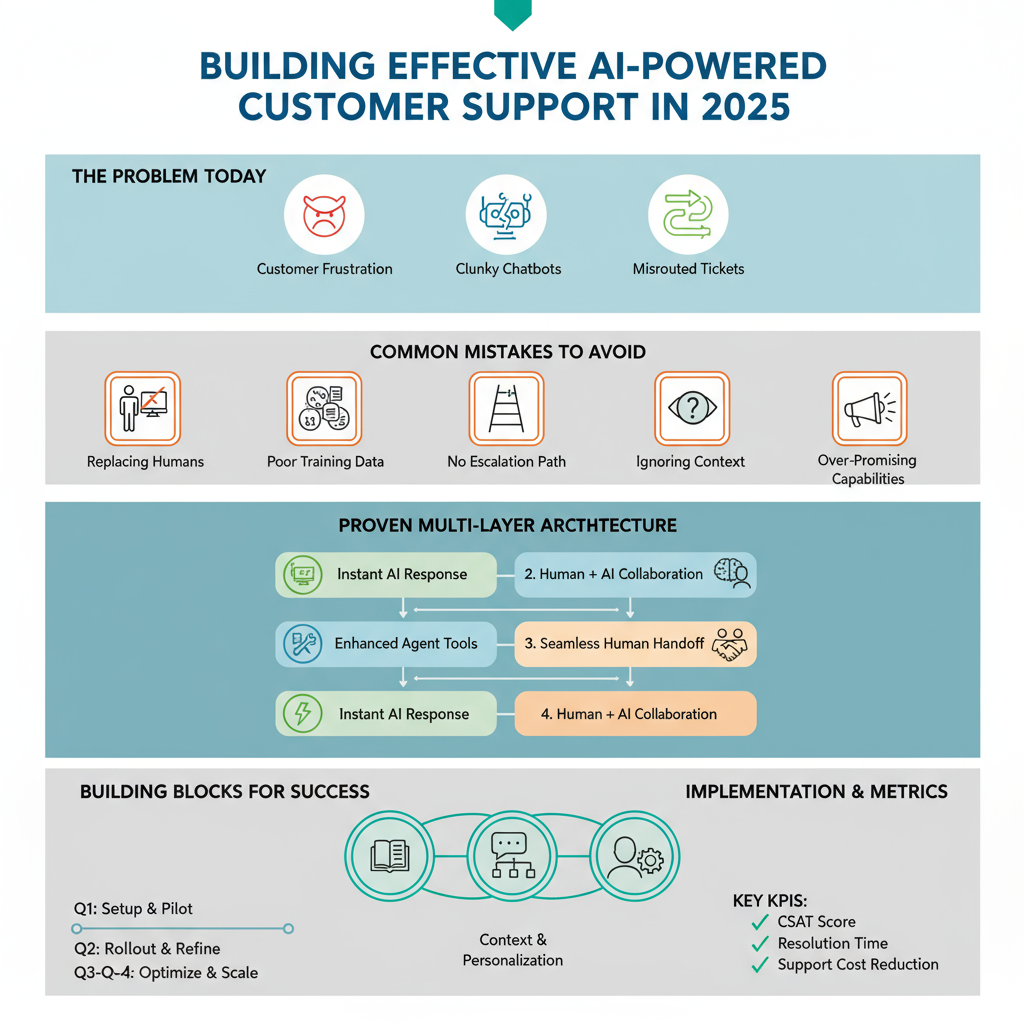
AI-powered customer support is everywhere now, but here’s the uncomfortable truth: most implementations are terrible. | AI customer support Customers get frustrated with chatbots that don’t understand them. Support tickets get misrouted. Questions go unanswered. Companies save money but lose customers. It doesn’t have to be this way. I’ve built AI support systems that customers actually like—systems that improve satisfaction while reducing costs. Let me show you how. Why Most AI Support Systems Fail Before building a solution, understand why others fail: Mistake 1: Replacing humans entirely AI should assist, not replace. The best systems blend AI efficiency with human empathy. Mistake 2: Poor training data Your AI is only as good as what it learns from. Garbage in, garbage out. Mistake 3: No escalation path When AI can’t help, customers need a clear path to human support—fast. Mistake 4: Ignoring context AI that treats returning customers like strangers creates frustration. Mistake 5: Over-promising Setting expectations that AI handles “everything” leads to disappointed customers. The Architecture That Works Here’s the proven structure for effective AI support: Layer 1: Instant AI Response (First 30 seconds) AI immediately acknowledges the inquiry, understands the question, and attempts resolution using your knowledge base. Layer 2: Enhanced AI with Tools (30 seconds – 5 minutes) If Layer 1 doesn’t resolve it, AI accesses additional tools: order lookup, account status, FAQ database, previous ticket history. Layer 3: Human Handoff (5+ minutes) For complex issues, AI creates a detailed summary and routes to the right human agent with full context. Layer 4: Human + AI Collaboration Agent handles the interaction with AI suggesting responses, pulling relevant information, and documenting the conversation. This architecture ensures customers get help fast while maintaining quality. Building Block 1: Knowledge Base Optimization Your AI is only as good as the information it can access. Here’s how to prepare: Audit existing documentation: Identify gaps, outdated info, and unclear explanations. Structure for AI consumption: Use clear headings, consistent formatting, and explicit answers to common questions. Create a question-answer database: Don’t just have articles—have specific Q&A pairs the AI can reference. Include edge cases: Document unusual scenarios and exceptions. Keep it updated: Set a monthly review schedule. AI trained on outdated information creates more problems than it solves. Building Block 2: Conversation Design AI conversations need careful design. Here’s the framework: Opening: Friendly acknowledgment + understanding check Example: “I understand you’re having trouble logging in. Let me help you with that.” Information gathering: Ask clarifying questions one at a time Bad: “What’s your email, order number, and the issue?” Good: “What email address did you use for your account?” Resolution attempt: Clear, actionable steps Use numbered lists. Confirm understanding. Check if the solution worked. Escalation trigger: Know when to hand off If AI asks for clarification more than twice, route to human. Closing: Ensure satisfaction before ending “Did this solve your issue?” with clear yes/no options. Building Block 3: Context and Personalization Generic AI responses feel robotic. Add context: Customer history: Reference previous interactions naturally. “I see you had a similar question last month about shipping…” Account status: Acknowledge their relationship with you. “As a premium member, I can fast-track this for you…” Current situation: Show you understand their specific case. “Since your order was placed yesterday, it’s still in processing…” Tone matching: Adjust formality based on how they communicate. Casual customer → friendly AI. Formal inquiry → professional AI. The Technology Stack Here’s a practical stack that works: AI Model: Claude or GPT-4 for conversation and understanding Vector Database: Pinecone or Weaviate for knowledge base search Integration Platform: Make.com or N8N to connect everything Helpdesk: Zendesk, Intercom, or Front for ticket management Analytics: Custom dashboard tracking resolution rates, handoff frequency, customer satisfaction Total monthly cost for small to medium business: $200-500 Implementation Roadmap Week 1-2: Preparation Week 3-4: Build MVP Week 5-6: Test and Refine Week 7-8: Expand Week 9+: Optimize Measuring Success: The Metrics That Matter Track these KPIs: AI Resolution Rate: Percentage of inquiries fully resolved by AI Target: 40-60% for most businesses Time to Resolution: Average time from inquiry to resolution Goal: Reduce by 50% or more Customer Satisfaction Score: Post-interaction ratings Target: Match or exceed human-only support scores Handoff Rate: How often AI escalates to humans Goal: Under 40% with clear handoff reasons Cost Per Ticket: Total support cost divided by tickets handled Typical savings: 30-50% cost reduction First Response Time: How quickly customers get initial response Target: Under 30 seconds Handling Different Support Channels Email Support: AI can draft complete responses that agents review before sending. This works well because timing isn’t critical. Live Chat: AI provides instant first response and handles simple questions fully. Seamless handoff to humans for complex issues. Phone Support: AI voice agents handle initial routing and information gathering, then connect to appropriate human agent with context. Social Media: AI monitors mentions, categorizes by urgency, drafts responses for agent approval. Never fully automated—too risky. The Human Element: Training Your Team Your support team might feel threatened by AI. Address this directly: Position AI as an assistant, not a replacement: Show how AI handles repetitive questions so they can focus on complex, interesting problems. Involve them in improvement: Support agents should review AI responses and suggest improvements. Highlight new opportunities: With AI handling basics, agents can focus on relationship building and solving challenging problems. Provide AI training: Teach your team how to work alongside AI effectively. Common Pitfalls and How to Avoid Them Pitfall: AI inventing answers Solution: Implement strict knowledge base search. If no confident answer exists, escalate immediately. Pitfall: Circular conversations Solution: Set a maximum of 2-3 clarification attempts before human handoff. Pitfall: Tone-deaf responses Solution: Detect frustration keywords and immediately escalate. Never let AI argue with angry customers. Pitfall: Privacy concerns Solution: Never have AI request sensitive information. Route to secure human channels for payment details, passwords, etc. Pitfall: Over-automation Solution: Always provide a clear “talk to a human” option within first response. Advanced Features to Add Later Once your basic system

Scroll to Top